
Archive for December, 2011
Unity: How to playback fullscreen videos using the GL class
Posted by Dimitri | Filed under Programming

This Unity programming tutorial explains how to use the immediate mode rendering available at the GL class for the playback of video files. There is already another post here on 41 Post that shows how to do the same thing using GUITexture component. However, in this tutorial, a quad is going to be rendered and the video will be played at its texture.
Not only the steps required for achieving fullscreen video playback are going to be explained, but how to properly scale the video based on the screen dimensions is also featured in this post. Warning: this tutorial works only with Unity Pro because the free version doesn’t support video decoding. This post has been created and tested in Unity version 3.4. At the end of the post, a Unity project featuring all the code explained here is available for download both in C# and JavaScript.
Continue reading: “Unity: How to playback fullscreen videos using the GL class”
Unity: How to create a speech balloon
Posted by Dimitri | Filed under Programming

This Unity tutorial explains how to create a speech balloon, like the ones featured on comic books, in Unity3D. For any game, objects move around the screen, and in order to make the speech bubbles work, they have to follow the movement of these objects. However, the balloon can’t be translated in the 3D space, or else it will look like a regular billboard sign over the character’s head. So, it has to follow the character on the two dimensional screen space. The elongated edge of the balloon must also follow the character’s movement, stretching and shrinking accordingly.
To solve these two issues, a script is necessary, which will treat the round part and the triangular tip of the balloon separately.
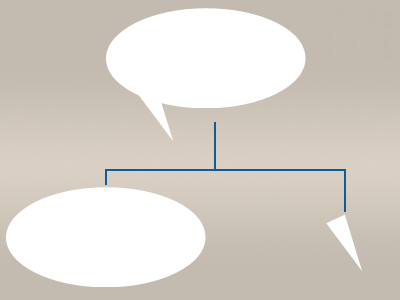
The script will create a speech balloon by rendering these two parts separately. They must have the same color to create the illusion that it's a single element.